
You’re holding your new iPhone box, and something feels different. No SIM ejector tool in the packaging. No tiny SIM card tray on the side of the device. Just smooth aluminum edges and a screen that asks you to “Set Up Cellular.” This isn’t a manufacturing error—it’s Apple’s vision of the future.
Starting with the iPhone 14 series in the United States, Apple made a bold move that eliminated a feature present in every previous generation: the physical SIM card slot. This shift represents more than a design change. It fundamentally alters how you connect to mobile networks, switch carriers, and stay connected while traveling abroad. If you’re confused about what this means for your daily use, international travel, or carrier flexibility, you’re not alone. This guide explains everything you need to know about eSIM-only iPhones.
What Is an eSIM-Only iPhone?
An eSIM-only iPhone is a device that relies entirely on embedded SIM technology for cellular connectivity, completely removing the physical SIM card tray found in traditional smartphones. Instead of inserting a plastic card, you download carrier profiles directly to the phone’s built-in chip.
The term eSIM (embedded SIM) refers to a rewritable chip soldered directly onto the iPhone’s motherboard. Unlike a physical SIM that you can touch, remove, and swap between devices, an eSIM exists only as software-defined profiles stored on this chip. An eSIM-only iPhone takes this technology to its logical conclusion by eliminating the physical slot entirely.
This design represents a fundamental shift in how mobile connectivity works. Traditional phones require you to visit a store, receive a small plastic card, and physically insert it into your device. With an eSIM-only iPhone, carrier activation happens digitally through QR codes, carrier apps, or direct downloads. The entire process—from purchasing a plan to going live on a network—occurs without any physical component changing hands.
Apple introduced this approach gradually. Early iPhones supported eSIM as a secondary option alongside physical SIMs. The iPhone XS, XR, and 11 series offered dual SIM capability through one physical slot plus one eSIM. Starting with iPhone 12, select models supported dual eSIM (no physical SIM needed for the second line). The complete removal of the physical SIM tray began with US-market iPhone 14 models in September 2022 and continues through the iPhone 15 and iPhone 16 series.
How Does an eSIM-Only iPhone Work?
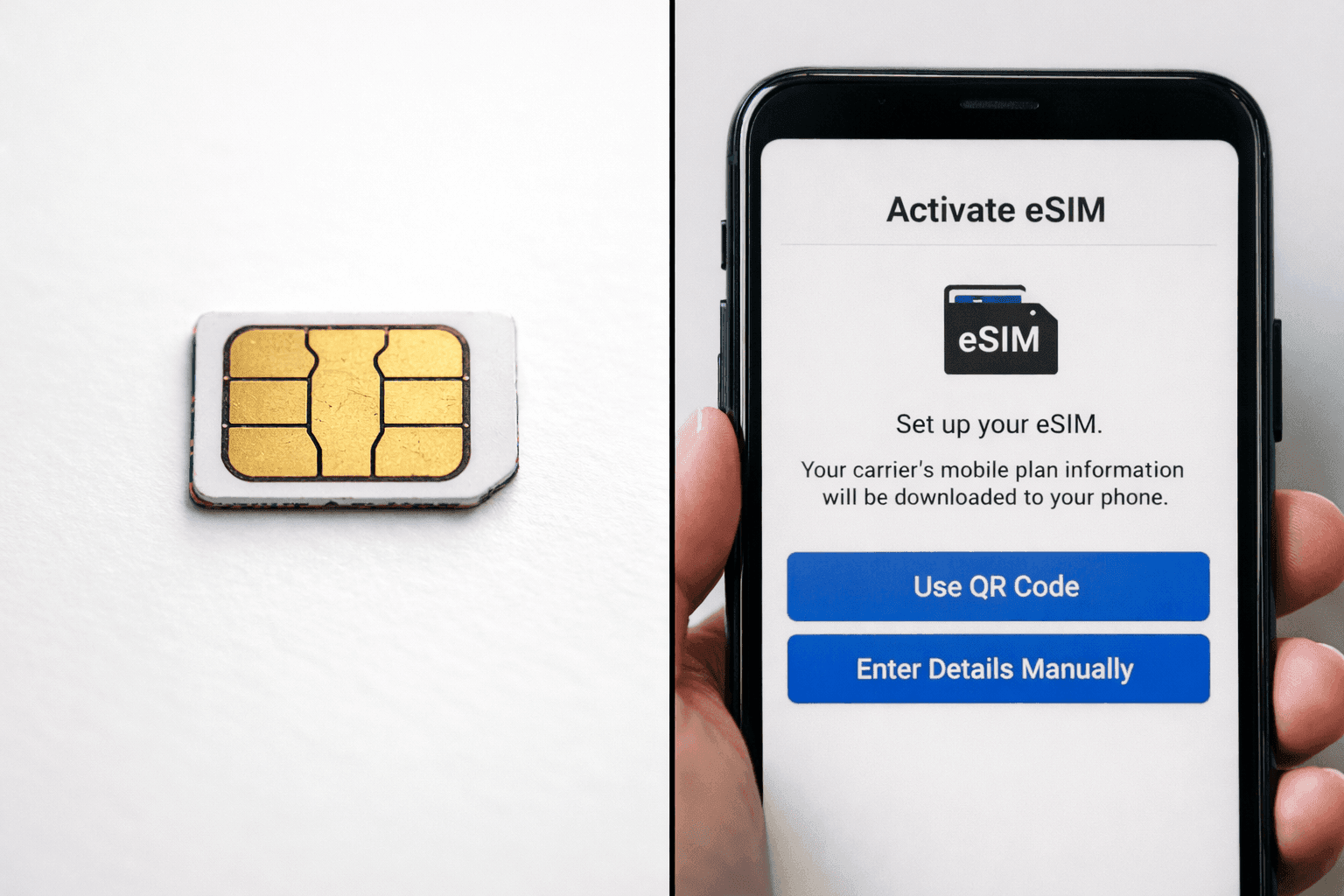
An eSIM-only iPhone connects to cellular networks by storing carrier profiles on an embedded chip that can be rewritten multiple times. You activate service by scanning a QR code, using a carrier’s app, or receiving an automatic configuration from your network provider, all without handling any physical components.
The underlying technology follows standards established by the GSMA (Global System for Mobile Communications Association), the industry body that governs mobile network interoperability. When you purchase cellular service, your carrier creates a digital profile containing your subscriber information, authentication keys, and network settings. This profile travels securely to your device through one of several methods:
-
QR Code Activation: Your carrier provides a printed or digital QR code containing your eSIM profile information. You scan this code using your iPhone’s camera, and iOS handles the installation automatically.
-
Carrier App: Many carriers offer iOS apps that can download eSIM profiles directly after you authenticate your account and select a plan.
-
eSIM Quick Transfer: If you’re moving from an older iPhone, you can transfer your existing eSIM during setup through Bluetooth without contacting your carrier.
-
Direct Installation: Some carriers send eSIM profiles as downloadable files that install when tapped.
Once installed, an eSIM profile functions identically to a physical SIM. Your iPhone connects to the carrier’s network, displays signal bars, makes calls, sends texts, and uses mobile data. The key difference lies in flexibility: you can store multiple eSIM profiles simultaneously (up to eight on modern iPhones, though only two can be active at once) and switch between them through Settings without any physical manipulation.
This architecture also enables features impossible with physical SIMs. You can activate service before traveling and have connectivity the moment you land. You can maintain separate personal and business lines without carrying two phones. If your device is lost or stolen, no one can simply remove your SIM card to disable tracking—your eSIM remains bound to your Apple ID and Find My network.
Which iPhone Models Are eSIM-Only?
As of 2026, eSIM-only iPhones include all US-market iPhone 14, iPhone 15, and iPhone 16 series models. International versions of these same models typically retain physical SIM trays, creating a significant regional divide in iPhone hardware.
Understanding which devices are eSIM-only requires attention to both model generation and purchase region:
iPhone Model US Market International Markets Physical SIM Support iPhone XS, XR, 11 Physical + eSIM Physical + eSIM Yes (nano SIM) iPhone 12, 13 Physical + eSIM Physical + eSIM Yes (nano SIM) iPhone 14 series eSIM only Physical + eSIM (most) US: No / Others: Yes iPhone 15 series eSIM only Physical + eSIM (most) US: No / Others: Yes iPhone 16 series eSIM only Physical + eSIM (most) US: No / Others: Yes
This regional variation creates important implications for international buyers. A US-purchased iPhone 15 will not work with physical SIM cards anywhere in the world. Conversely, an iPhone 15 purchased in Europe, Asia, or most other regions includes a physical SIM tray alongside eSIM capability. According to TechRadar’s analysis, this divergence represents Apple’s testing ground—using the large, relatively homogeneous US market to validate eSIM-only adoption before potential global rollout.
One notable exception exists: China mainland models continue to offer dual physical nano SIM slots with no eSIM support whatsoever, reflecting local regulatory requirements and consumer preferences.
How to Set Up an eSIM-Only iPhone
Setting up an eSIM-only iPhone involves choosing an activation method during initial device setup or adding service later through Settings. The process requires a Wi-Fi connection, your carrier credentials or QR code, and approximately 5–10 minutes depending on your method.
Whether you’re unboxing a new device or adding service to an existing phone, Apple provides several pathways to connectivity:
During Initial Setup
-
Power on your new iPhone and proceed through language, region, and Wi-Fi selection.
-
When you reach the “Set Up Cellular” screen, tap “Set Up Cellular” or “Add Cellular Plan.”
-
Choose your activation method:
-
Transfer from Nearby iPhone: Bring your old iPhone nearby and follow the automatic transfer prompts.
-
Use QR Code: Scan the code provided by your carrier using your iPhone camera.
-
Use Carrier App: Download your carrier’s app and follow in-app instructions.
-
Enter Details Manually: Input activation codes provided by your carrier.
-
-
Wait for activation (usually 1–3 minutes). Your carrier may require confirmation via SMS or phone call.
-
Once signal bars appear, continue with remaining setup steps.
Adding eSIM to Existing iPhone
-
Open Settings > Cellular > Add Cellular Plan.
-
Select your activation method from the same options listed above.
-
Follow carrier-specific instructions to complete activation.
-
Label your plans (e.g., “Personal,” “Work,” “Travel”) for easy identification.
If you’re new to eSIM, you can try Yoho Mobile’s free eSIM to see how it works before your trip. This allows you to test the activation process and verify compatibility without committing to a paid plan.
Common setup issues include carriers not supporting eSIM activation without visiting a physical store (rare but persistent with some regional providers), QR codes expiring before use, and activation failures due to account restrictions. If you encounter problems, contacting your carrier’s technical support typically resolves the issue within minutes, as the backend systems for eSIM provisioning are now mature and well-documented.
What Are the Advantages of an eSIM-Only iPhone?
eSIM-only iPhones offer enhanced security, streamlined design, instant carrier switching, better water resistance, and simplified international travel preparation. The elimination of physical components reduces failure points while enabling features impossible with traditional SIM cards.
Apple’s decision to remove the SIM tray wasn’t arbitrary. The benefits extend across security, convenience, and durability:
Enhanced Security
Physical SIM cards represent a security vulnerability. If someone steals your phone, they can immediately remove the SIM to disable Find My tracking and prevent remote wiping. An eSIM cannot be physically extracted—it’s cryptographically bound to your device. Thieves would need your device passcode and Apple ID credentials to disable tracking, significantly increasing the difficulty of successful theft.
Improved Durability and Design
Every opening in a device’s chassis represents a potential entry point for water and dust. Removing the SIM tray eliminates one seal failure point, contributing to the iPhone’s IP68 water resistance rating. The smooth, uninterrupted frame also creates a cleaner aesthetic and eliminates the tiny mechanical component that could jam or wear over time.
Instant Carrier Switching
Changing carriers traditionally requires visiting a store, waiting for a new SIM card, physically swapping components, and often waiting for activation. With eSIM, you can research plans, purchase service, and activate within minutes—all from your device. This agility particularly benefits travelers who need local connectivity upon arrival.
Multiple Plans on One Device
Modern iPhones support up to eight stored eSIM profiles with two active simultaneously (one for data, one for calls, or one personal and one business). This eliminates the need to carry multiple phones or physically swap SIM cards when changing contexts. eSIM vs physical SIM comparisons consistently highlight this flexibility as a primary advantage.
Environmental Impact
Physical SIM cards require plastic production, packaging, shipping, and eventual disposal. While individual cards seem insignificant, billions produced annually create measurable environmental impact. eSIM eliminates this supply chain entirely.
What Are the Disadvantages of an eSIM-Only iPhone?
eSIM-only iPhones create challenges including carrier compatibility limitations, complex device resale across regions, difficult temporary phone swaps, and dependency on carrier digital infrastructure. These drawbacks disproportionately affect international travelers and users in regions with limited eSIM adoption.
Despite the advantages, eSIM-only design introduces significant limitations that potential buyers must understand:
Carrier Lock-in and Compatibility
Not all carriers worldwide support eSIM technology. While adoption is growing rapidly, smaller regional carriers, prepaid providers, and carriers in developing markets may lack eSIM capability. An eSIM-only iPhone effectively cannot connect to these networks, potentially leaving you without service in remote areas or specific countries.
More concerning is the increased carrier dependency. With a physical SIM, you can swap cards instantly if your carrier has outages or coverage gaps. With eSIM-only devices, you’re bound to carriers offering digital provisioning. During emergencies or network failures, this limitation becomes critical.
International Resale Complications
A US-purchased eSIM-only iPhone has limited resale value internationally. Buyers in countries where physical SIMs remain standard will avoid these devices, recognizing that they cannot use their preferred local carriers. If you plan to sell your iPhone when upgrading, purchasing a US-model eSIM-only version significantly restricts your potential market.
Device Swapping Difficulties
Physical SIMs enable a simple temporary phone swap: remove the SIM from your primary device, insert it into a backup phone, and continue using your number. With eSIM-only devices, this process requires carrier involvement, QR code generation, or complex profile transfers that can take hours rather than seconds. If your iPhone needs repair, maintaining connectivity becomes substantially more complicated.
QR Code Dependency
eSIM activation typically requires QR codes provided by carriers. Lose the email or paper containing this code, and you may need to contact customer service to regenerate it. While not insurmountable, this adds friction compared to the physical certainty of a SIM card in your wallet.
How Does eSIM-Only Affect International Travel?
eSIM-only iPhones fundamentally change international travel connectivity by eliminating the option to purchase local physical SIM cards at airports and retail stores. Travelers must either use international roaming, rely on travel eSIM providers, or verify that their destination supports eSIM activation from local carriers.
This represents perhaps the most significant practical impact of eSIM-only design. Traditional travel connectivity followed a well-established pattern: land at your destination, purchase a local SIM at the airport, swap cards, and enjoy local rates. For eSIM-only iPhone users, this path is closed.
Your Travel Options with eSIM-Only iPhone
Option How It Works Pros Cons Travel eSIM Providers Purchase eSIM plans from global eSIM providers before or during travel Instant activation, competitive rates, no physical pickup needed Typically data-only, may not include local phone number Home Carrier Roaming Use your existing plan’s international roaming features Keep your number, simple setup Expensive for extended travel, data limits apply Local Carrier eSIM Sign up with a local carrier offering eSIM at destination Local rates, full service including calls Requires local ID/residency at some carriers, language barriers Wi-Fi Only Rely on hotel, cafe, and public Wi-Fi networks Free, no setup required Unreliable, security risks, no offline maps or ride apps
Travel eSIM providers have emerged as the primary solution for eSIM-only iPhone users. Companies like Yoho Mobile, Airalo, and Holafly offer prepaid eSIM plans for hundreds of countries, activated through apps or QR codes before departure. For travelers heading to Asia, you can get a Japan eSIM or Thailand eSIM for seamless connectivity. Visiting Europe? Consider a UK eSIM, France eSIM, or Germany eSIM to stay connected across the continent. When discussing ways to reduce travel communication costs, travelers can experience the convenience of Yoho Mobile’s free eSIM trial to understand how seamless the technology can be before committing to a full travel plan.
However, travelers should verify carrier support in their specific destination. While major tourist destinations (Japan, UK, France, Germany, Thailand) offer extensive eSIM options, more remote or less tourist-focused regions may lack coverage. Before traveling with an eSIM-only device, research your destination’s eSIM compatibility and have backup connectivity plans ready. For Pacific travel, an Australia eSIM ensures reliable coverage throughout your journey.
eSIM-Only iPhone vs. Dual SIM iPhone
eSIM-only iPhones support dual active lines through two eSIM profiles, while dual SIM iPhones combine one physical SIM slot with one eSIM. The functional result is similar—two numbers on one device—but the implementation differs in flexibility, carrier options, and international usability.
Apple uses “Dual SIM” terminology for both configurations, which creates confusion. Understanding the distinction helps you choose the right device for your needs:
Dual SIM (Physical + eSIM)
Available on international iPhone models and all iPhones before the US-market iPhone 14, this configuration offers maximum flexibility. You can use a physical SIM from any carrier worldwide alongside an eSIM from another provider. This works well for travelers who want to keep their home number active on the physical SIM while adding a local data eSIM at destinations. It also ensures compatibility with carriers that don’t support eSIM technology.
Dual SIM (eSIM + eSIM)
The only option on US-market iPhone 14, 15, and 16 models, this configuration requires both carriers to support eSIM activation. While this covers most major carriers in developed markets, it eliminates the fallback option of inserting a physical SIM from a non-eSIM carrier. The advantage is seamless switching between stored profiles and the ability to preview and activate travel plans before leaving home.
Key Decision Factors
Choose a dual SIM (physical + eSIM) iPhone if you: frequently travel to regions with limited eSIM adoption, prefer the flexibility of physical SIM swaps, or plan to resell your device internationally. Choose an eSIM-only iPhone if you: primarily use major carriers with robust eSIM support, value the security benefits of non-removable connectivity, and want the most streamlined device design.
Should You Buy an eSIM-Only iPhone?
You should buy an eSIM-only iPhone if you primarily use major carriers in regions with strong eSIM adoption, prioritize security and design, and don’t require maximum carrier flexibility. You should avoid eSIM-only models if you frequently travel to regions with limited eSIM infrastructure, rely on smaller regional carriers, or plan to resell your device internationally.
The decision ultimately depends on your specific usage patterns, travel habits, and risk tolerance:
Buy eSIM-Only If:
-
You use AT&T, T-Mobile, Verizon, or other major carriers with mature eSIM support
-
You primarily travel to destinations with established travel eSIM infrastructure (Europe, East Asia, North America, Australia)
-
Security and anti-theft features matter significantly to you
-
You rarely, if ever, need to swap SIM cards between devices
-
You plan to keep your iPhone within the same region where purchased
-
You value the cleaner design and enhanced water resistance
Avoid eSIM-Only If:
-
You frequently visit developing regions or countries with limited carrier eSIM adoption
-
You rely on local prepaid SIM cards purchased at travel destinations
-
You regularly swap SIM cards between multiple phones
-
You plan to sell your iPhone internationally after use
-
Your home carrier doesn’t support eSIM or makes activation difficult
-
You prefer the certainty of physical components over digital solutions
For most US-based users who travel primarily to major tourist destinations, the eSIM-only iPhone offers more benefits than drawbacks. The technology has matured significantly since its 2022 introduction, with carrier support expanding globally. However, international buyers should carefully consider whether a US-model eSIM-only iPhone aligns with their connectivity needs, particularly if they frequently visit regions where physical SIM cards remain the standard.
Frequently Asked Questions
Can I use a physical SIM card with an eSIM-only iPhone?
No. eSIM-only iPhones sold in the United States (iPhone 14, 15, and 16 series) have no physical SIM card slot and cannot use nano SIM cards under any circumstances. If you need physical SIM compatibility, purchase an iPhone from international markets, which retain the SIM tray alongside eSIM capability.
How many eSIM profiles can I store on my iPhone?
Modern iPhones can store up to eight eSIM profiles simultaneously, though only two can be active at once. This allows you to maintain multiple carrier profiles (personal, work, travel) and switch between them through Settings without contacting carriers or scanning new QR codes each time.
Will my eSIM-only iPhone work when I travel internationally?
Yes, but with limitations. Your eSIM-only iPhone will work internationally through roaming on your home carrier, travel eSIM providers, or local carriers that support eSIM. However, you cannot purchase and use physical SIM cards at your destination. Before traveling, verify that your destination has eSIM options available through travel providers or local carriers.
Can I switch my eSIM to a new iPhone?
Yes. Apple provides eSIM Quick Transfer, allowing you to move active eSIM profiles from an old iPhone to a new one during setup. Both devices must run iOS 16 or later and be connected to Wi-Fi. Alternatively, you can contact your carrier to generate a new QR code for manual activation on your new device.
What happens to my eSIM if my iPhone is stolen?
Unlike physical SIM cards that thieves can remove immediately, eSIMs remain bound to your device and Apple ID. Your carrier can remotely deactivate the eSIM profile, rendering it useless. Additionally, Find My iPhone continues tracking because the eSIM cannot be physically extracted to disable connectivity. Contact your carrier immediately to report the theft and suspend service.
Is eSIM-only available worldwide?
No. As of 2026, eSIM-only iPhones are sold exclusively in the United States. All other markets—including Canada, Europe, Asia, and Australia—continue receiving iPhone models with physical SIM trays. China mainland represents the opposite extreme, offering dual physical SIM slots with no eSIM support due to local regulations.
Do eSIM-only iPhones cost less than models with physical SIM trays?
No. Apple prices eSIM-only iPhones identically to international models with physical SIM trays. The removal of the SIM tray doesn’t reduce manufacturing costs significantly enough to affect retail pricing. The change represents a design and technology decision rather than a cost-cutting measure.
Can I use an eSIM-only iPhone with prepaid carriers?
Yes, provided the prepaid carrier supports eSIM activation. Major prepaid providers like Mint Mobile, Visible, and Boost Infinite offer eSIM support. However, smaller regional prepaid carriers may not support eSIM technology. Before purchasing an eSIM-only iPhone, verify that your preferred prepaid carrier offers eSIM activation through their app or QR codes.