Is My Phone Unlocked for eSIM? Simple 2026 Guide to Check
You’re all packed for your trip to Europe, ready to capture every moment. You’ve even smartly purchased a travel eSIM to avoid outrageous roaming fees. But then, a thought crosses your mind: “Wait… is my phone even unlocked?” It’s a question that can mean the difference between seamless connectivity and a frustrating search for Wi-Fi.
Don’t let a locked phone derail your travel plans. A “carrier-locked” phone is restricted to its original provider’s network, meaning it won’t accept an eSIM from another company. This guide provides simple, step-by-step methods to check if your iPhone or Android is unlocked and ready for adventure.
Before you go, ensure you have a flexible data plan. With Yoho Mobile, you can build your own travel eSIM plan tailored to your exact needs, so you only pay for what you use.
What Does a “Carrier-Locked” Phone Mean?
Simply put, a carrier-locked phone is a device sold by a mobile provider (like Verizon, AT&T, or Vodafone) that is software-restricted to only work on their network. This is often done with subsidized phones purchased on a contract.
An unlocked phone, on the other hand, is free from these restrictions. You can insert a SIM card or install an eSIM from any compatible carrier, anywhere in the world. For travelers, this freedom is essential. It allows you to use affordable, local data plans with an eSIM and sidestep the hefty international roaming charges from your home provider.
How to Check if Your iPhone is Unlocked
Apple makes it incredibly easy to check your iPhone’s lock status. Here are the most reliable methods.
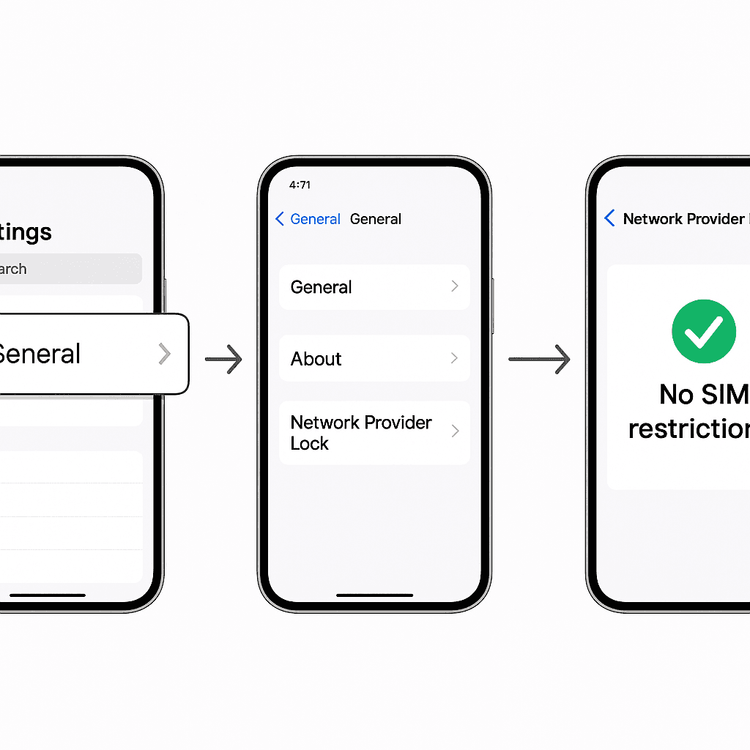
Method 1: The iOS Settings Check (Easiest Way)
This is the definitive way to check on any modern iPhone.
- Open the Settings app.
- Tap General, then tap About.
- Scroll down to the bottom. Look for a field named Network Provider Lock or Carrier Lock.
- If it says “No SIM restrictions,” congratulations! Your iPhone is unlocked and ready for any eSIM.
- If it lists a carrier name, your phone is locked to that provider.
Method 2: The SIM Card Test
If you can’t find the option in Settings, this classic method works well.
- Power off your iPhone.
- Use a SIM ejector tool to remove your current SIM card.
- Insert a SIM card from a different carrier (borrow one from a friend or family member).
- Power your iPhone back on.
- If you see the new carrier’s name at the top of the screen and can make a call or use cellular data, your phone is unlocked. If you get an error message like “SIM Not Supported,” it’s locked.
How to Check if Your Android Phone is Unlocked
The process for Android can vary slightly between manufacturers like Samsung, Google, and OnePlus, but the core principles are the same.
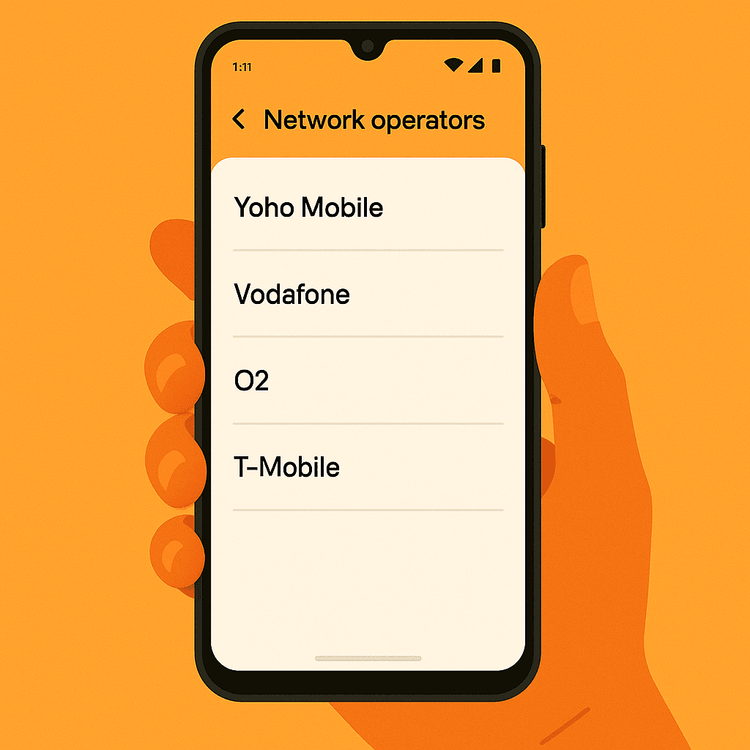
Method 1: The Android Settings Check
- Go to Settings > Network & Internet (or Connections).
- Tap on Mobile Network (or SIM Card & Mobile Networks).
- Look for an option called Network Operators or Choose Network.
- Tap it and turn off the “Automatically select network” toggle.
- Your phone will search for available networks. If it displays a list of other carriers, your phone is most likely unlocked. If the search fails or is greyed out, it may be locked.
Method 2: The Universal SIM Card Test
Just like with an iPhone, swapping SIM cards is a surefire test. If a SIM from another carrier works for calls and data, your Android phone is unlocked.
Method 3: Use an Online IMEI Checker
Every phone has a unique 15-digit International Mobile Equipment Identity (IMEI) number.
- Find your IMEI by dialing *#06# on your phone’s keypad.
- Visit a reputable IMEI checking website, like IMEI.info, and enter your number.
- The report will often include the phone’s lock status.
My Phone is Locked. Now What?
Finding out your phone is locked isn’t the end of the road. You can usually get it unlocked, but it’s best to do this well before your trip.
The only legitimate way to unlock your phone is by contacting the original carrier it’s locked to. Most carriers will unlock your device for free if you meet their requirements, which typically include:
- The phone is fully paid for.
- Your account is in good standing (no overdue bills).
- The phone has not been reported lost or stolen.
- The device has been active on their network for a specific period (e.g., 60 days).
According to regulations in many countries, like those outlined by the FCC in the United States, carriers are obligated to honor unlocking requests from eligible customers. The process can take a few business days, so don’t leave it until the last minute!
Once unlocked, you’re free to experience the world. Get a head start by trying our free trial eSIM to test your connectivity at no cost.
Why an Unlocked Phone + eSIM is Your Best Travel Companion
Traveling with an unlocked phone gives you ultimate freedom and control over your connectivity.
- Avoid Roaming Fees: Stop paying your home carrier’s expensive international rates.
- Instant Connectivity: Install a Yoho Mobile eSIM in minutes. For iOS users, it’s even simpler—no QR code needed! Just tap “Install” after purchase to begin the seamless setup.
- Flexibility: Choose from dozens of local, regional, and global plans. Heading to Japan and then Thailand? Get a plan that covers both. Explore plans for over 200 destinations.
- Peace of Mind: Before purchasing, always confirm your device is on the official eSIM compatible devices list to ensure a smooth experience.
Frequently Asked Questions (FAQ)
Can I use an eSIM if my phone is carrier-locked?
No, a phone must be unlocked by the original carrier to install and use an eSIM from a different provider like Yoho Mobile. A locked phone will reject any foreign eSIM profile.
How do I know if my phone is unlocked for international travel?
The methods are the same as checking domestically. The most reliable sign for an iPhone is the “No SIM restrictions” message in your settings. For any phone, successfully using a SIM card from a different carrier proves it’s unlocked for international use.
Is it legal for my carrier to refuse to unlock my phone?
Carriers can only refuse if you haven’t met their terms of service, such as not having fully paid off the device or having an account with an outstanding balance. If you are eligible, they are generally required by law to unlock it upon request.
What’s the difference between a locked phone and an eSIM-compatible phone?
These are two separate characteristics. A phone can be eSIM-compatible (meaning it has the built-in technology) but still be carrier-locked. To use a travel eSIM, your phone must be both eSIM-compatible and unlocked.
Conclusion: Unlock Your Phone, Unlock Your Travels
Checking your phone’s lock status is a simple but vital step in your travel preparations. A quick look in your settings can save you from stress and unexpected costs abroad. By ensuring your device is unlocked, you open up a world of affordable and convenient connectivity with a travel eSIM.
Ready to travel without limits? With your unlocked phone, you can explore Yoho Mobile’s flexible global eSIM plans and stay connected wherever you roam. And with the added security of Yoho Care, you have a backup network even if you run out of data, ensuring you’re never left disconnected.
VIŠE PAŽLJIVO ODABRANIH SAVETA ZA PUTOVANJA
5 Steps to Use Your Yoho Mobile eSIM when Traveling
Are you embarking on an exciting journey with our Yoho Mobile eSIMs? We’re helping you unveil the secrets of using our eSIM while traveling.
What Does No SIM Restrictions Mean?
Learn what 'No SIM restrictions' means for your iPhone. Understand carrier lock status and benefits of unlocking.
eSIM Not Working? Your 2025 Troubleshooting Guide to Fix It Fast
Landed abroad and your eSIM has no internet? Don't panic. Our step-by-step guide helps you troubleshoot and fix common eSIM issues so you can get connected.