
How to Activate eSIM on Xiaomi Phones | 2026 Step-by-Step Guide
Xiaomi phones, including their Redmi and POCO sub-brands, have won over millions of users with their powerful features and affordable prices. As travel resumes and the need for seamless connectivity grows, many are asking: can my Xiaomi device use an eSIM? The answer is yes, for many of the newer, flagship models!
eSIM technology eliminates the need for physical SIM cards, allowing you to activate a mobile data plan digitally. This is a game-changer for international travelers who want to avoid expensive roaming charges and the hassle of finding a local SIM upon arrival. This guide will walk you through everything you need to know about using an eSIM on your Xiaomi phone.
Ready to ditch physical SIM cards for your next trip? Explore Yoho Mobile’s hassle-free eSIM plans for global travel.

Do Xiaomi Phones Support eSIM?
While eSIM adoption is growing, not every Xiaomi device has this capability. Typically, eSIM support is found in their flagship models. Prominent examples include the Xiaomi 12T Pro, Xiaomi 13 series, and the latest Xiaomi 14 series. Unfortunately, most budget-friendly Redmi and POCO models do not yet feature eSIM technology.
There are two simple ways to confirm if your specific model is compatible:
- Check the Official List: The most reliable method is to check our comprehensive eSIM compatible devices list. This page is regularly updated with the latest phones from all major manufacturers, including Xiaomi.
- Find Your EID: An EID (Embedded Identity Document) number is a unique identifier for your phone’s eSIM chip. If your phone has one, it supports eSIM. To find it, open your phone’s dialer and type
*#06#. If you see an EID number displayed along with your IMEI, your device is eSIM-ready!
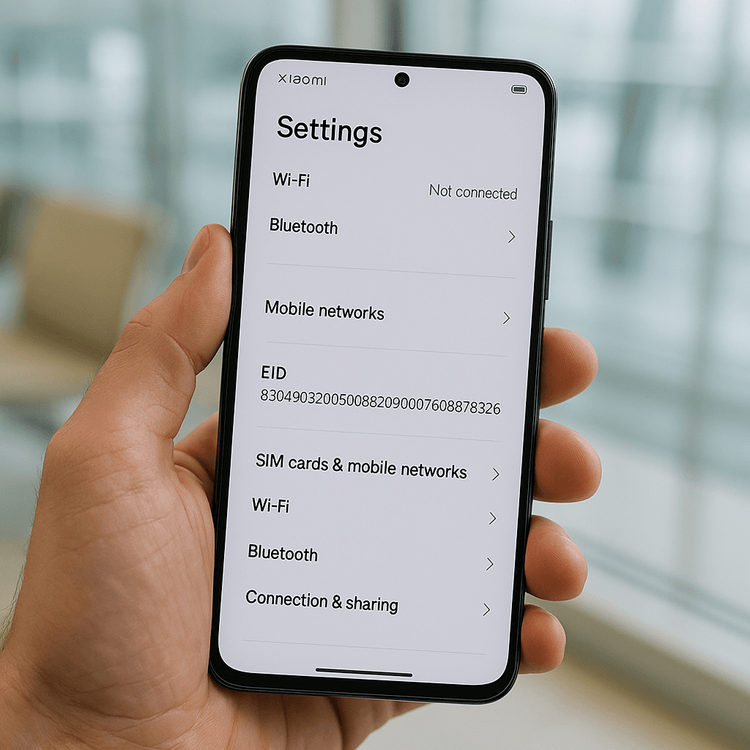
How to Activate Your Yoho Mobile eSIM on a Xiaomi Phone (MIUI Guide)
Activating an eSIM on your Xiaomi device is a straightforward process through the MIUI (or the new HyperOS) interface. Before you start, make sure you have a stable Wi-Fi connection.
Here’s how to get your Yoho Mobile eSIM up and running:
- Navigate to Settings: Open the main
Settingsapp on your phone. - Find Network Settings: Tap on
SIM cards & mobile networks. - Manage eSIM: Look for an option called
Manage eSIM. If you don’t see this, your device likely doesn’t support the feature. - Add Your Plan: Tap on
Add eSIMor a+icon. Your phone will now give you the option to scan a QR code. - Scan the QR Code: Use your phone’s camera to scan the QR code you received from Yoho Mobile after your purchase. If you can’t scan the code, you can also select the option to
Enter activation codemanually. - Download and Install: Follow the on-screen prompts to download and install the eSIM profile. This may take a minute.
- Label Your eSIM: Once installed, it’s a great idea to label your new eSIM. For example, name it “Yoho Travel” to easily distinguish it from your primary SIM.
- Set Data Preferences: Go back to
SIM cards & mobile networksand set the preferences forDefault for callsandMobile data. For travel, you should set Mobile data to your newly installed Yoho Mobile eSIM.
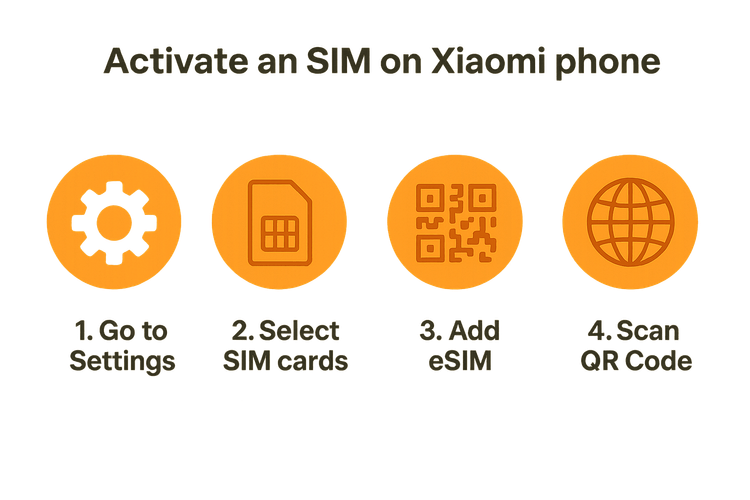
It’s that simple! Now that you know the process, you can pick the perfect data plan for your destination. Build your flexible travel plan with Yoho Mobile and only pay for the data and days you truly need.
Tips for a Smooth eSIM Experience on Xiaomi
To ensure a hassle-free connection when you land, keep these tips in mind:
- Enable Data Roaming: This is the most crucial step. For your Yoho Mobile eSIM to connect to partner networks abroad, you must turn on Data Roaming for it in the SIM card settings. Don’t worry, with a prepaid eSIM, you will never incur unexpected roaming charges.
- Choose the Right Network: Ensure your Yoho Mobile eSIM is selected as the primary source for mobile data. This prevents your phone from using your home SIM and racking up expensive fees. You can still receive calls and texts on your primary number.
- Stay Protected from Disconnection: Worried about using up all your data unexpectedly? With Yoho Care, you’re never truly disconnected. We provide a backup connection to ensure you can always access essential services like maps and messaging, even if your main data plan is depleted.
Frequently Asked Questions (FAQ)
What should I do if my Xiaomi eSIM is not working after installation?
First, ensure data roaming is enabled for your eSIM in your phone’s network settings. Second, try restarting your device, as this often resolves initial connection issues. If the problem persists, you can try manually selecting a network operator from the list of available networks in the same settings menu. For any further trouble, our 24/7 support team is always ready to assist.
Can I have multiple eSIM plans on my Xiaomi phone?
Yes, most eSIM-compatible Xiaomi phones, like the Xiaomi 14 Pro, allow you to store multiple eSIM profiles. However, you can typically only have one or two active at the same time. This is perfect for switching between a home plan and an international travel plan from Yoho Mobile without swapping physical SIM cards.
My phone is a Redmi Note. Does it support eSIM?
Generally, eSIM technology is reserved for Xiaomi’s flagship ‘Mi’ series (e.g., Xiaomi 13, 14). Most Redmi and POCO models do not yet support eSIM. The best way to know for sure is to check for an EID by dialing *#06# or by looking at our official eSIM compatibility list.
Do I need to remove my physical SIM to use an eSIM on my Xiaomi?
No, you don’t. The beauty of dual SIM technology is using both simultaneously. You can keep your primary physical SIM for your regular number while using your Yoho Mobile eSIM for affordable, high-speed mobile data abroad. This setup is ideal for avoiding high roaming charges from your home carrier.
Conclusion
Activating an eSIM on a compatible Xiaomi device is a simple, quick process that unlocks a world of convenient and affordable global connectivity. By checking your phone’s compatibility and following the steps above, you can say goodbye to expensive roaming fees and the hassle of physical SIM cards forever. Whether you’re traveling for business or leisure, an eSIM keeps you connected effortlessly.
Ready to experience seamless travel connectivity? Get a free eSIM trial with Yoho Mobile and see how easy it is to stay connected on your Xiaomi phone!
WEITERE KURATIERTE REISE-TIPPS
Activate Yoho Mobile eSIM on Samsung Galaxy | Easy Setup Guide
Mehr erfahrenTutorialsActivate Yoho Mobile eSIM on iPhone 16: 2025 Step-by-Step Guide
Mehr erfahrenTroubleshootingHow to Install and Activate Your Yoho eSIM on Android
Mehr erfahreneSIM Basics5 Steps to Use Your Yoho Mobile eSIM when Traveling
Mehr erfahren