
Expired Yoho Mobile eSIM? How to Add a New Plan & Reuse It
Your trip is over, your data plan has expired, and you’re back home. You might be wondering, “What happens to the Yoho Mobile eSIM still on my phone? Do I need a new one for my next adventure?”
We have great news: In most cases, you absolutely can add a new plan to your existing Yoho Mobile eSIM. It’s one of the best features of modern eSIM technology—no need to discard, replace, or go through a new setup process. Let’s dive into how it works.
Ready to plan your next trip? Explore flexible data plans for over 200 destinations now!
The Simple Answer: Yes, You Can Reuse Your Expired Yoho Mobile eSIM!
Think of your eSIM as a reusable digital SIM card that lives permanently on your phone. When your data plan expires, only the plan itself becomes inactive. The underlying eSIM profile—the thing that connects your phone to our network—remains securely stored on your device, waiting for its next assignment.
This is a major advantage over traditional physical SIM cards, which often become useless once their initial plan is finished. By reusing your eSIM, you’re not just saving time; you’re also making a more environmentally friendly choice. According to the GSMA, the organization that oversees eSIM standards, this technology is designed to make managing mobile subscriptions more flexible and sustainable.
So, as long as you haven’t manually deleted the eSIM profile from your phone’s settings, you can easily top it up with a new plan for your next destination, whether it’s a weekend trip to the United States or a multi-country tour of Europe.
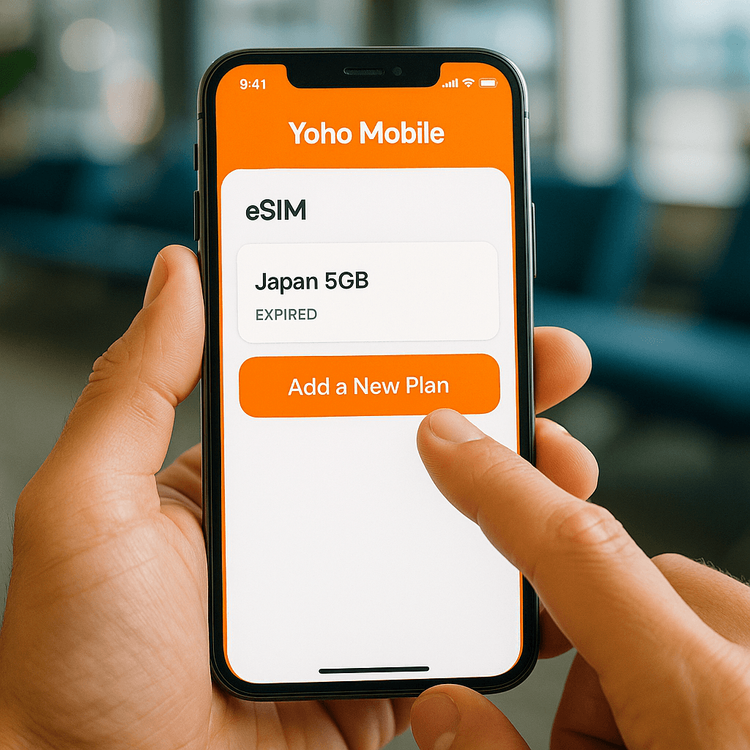
How to Add a New Plan to Your Expired eSIM: A Step-by-Step Guide
Reactivating your expired eSIM with a new data plan is designed to be quick and intuitive, getting you connected in minutes. Here’s how to do it directly from the Yoho Mobile app:
- Open the Yoho Mobile App: Make sure you are logged into the account you used to purchase the original plan.
- Navigate to ‘My eSIMs’: You’ll find a list of all your eSIMs, including active, expired, or never-used ones.
- Select Your Expired eSIM: Tap on the eSIM you wish to reuse. You’ll see its previous plan details and an option to add a new one.
- Choose and Purchase a New Plan: You’ll be presented with a variety of data plans. You can choose a plan for the same country or an entirely new destination. Select the data amount and duration that fits your upcoming trip.
- Activate Instantly: Once the purchase is complete, the new plan will be attached to your eSIM and will activate automatically upon arrival at your destination. No new QR codes, no complex installation.
That’s it! Your old eSIM is now ready for your next journey.
What if I Deleted the eSIM from My Phone?
This is an important point: if you have gone into your phone’s cellular settings and manually deleted the eSIM profile, it cannot be recovered or reused. Deleting the profile is like throwing away a physical SIM card—it’s gone for good.
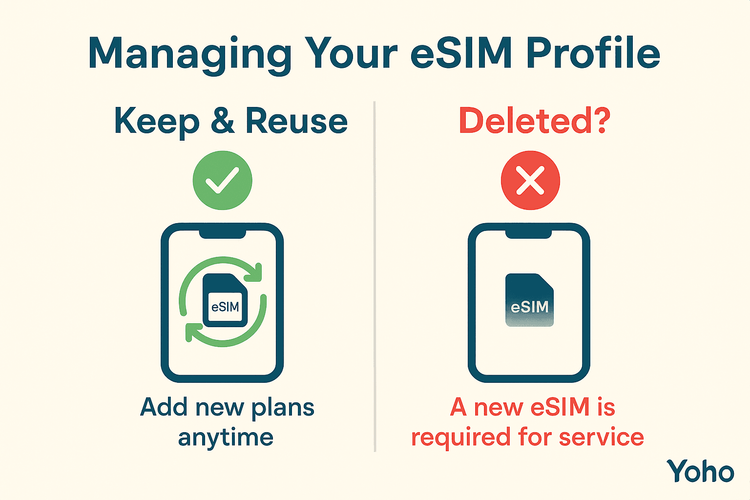
If you’ve deleted your eSIM, you will need to “purchase” a new free eSIM profile from the Yoho Mobile app and install it. While our eSIMs are free, this does mean going through the initial installation process again. To avoid this, we always recommend keeping your Yoho Mobile eSIM profile on your device, even after a plan expires.
This is also where Yoho Care provides peace of mind. Even if you run out of high-speed data, Yoho Care can provide a basic connection to keep you online for essential needs, ensuring you’re never completely cut off. Just remember to keep the eSIM profile installed!
Before your next trip, it’s always a good idea to check that your device is still on our eSIM compatible devices list.
Frequently Asked Questions (FAQ)
How long after my plan expires can I add a new one?
There’s no time limit for your eSIM top up. As long as the eSIM profile remains installed on your phone, you can add a new plan to it weeks, months, or even years later.
Can I add a plan for a different country to my old eSIM?
Yes, absolutely! This is a key benefit of Yoho Mobile. If your last trip was to Japan, you can easily add a new plan for Spain to that very same eSIM. Our system is designed for global travelers who need that flexibility.
What happens if I can’t see my expired eSIM in the app?
First, double-check that you are logged into the correct Yoho Mobile account. If you’re sure you are, it’s possible the eSIM profile was accidentally deleted from your device’s settings. In that case, you will need to acquire a new eSIM. Our support team is always ready to help.
Is it cheaper to add a plan to an old eSIM than getting a new one?
The cost is for the data plan itself, not the eSIM profile. Installing a new Yoho Mobile eSIM profile is always free. The main benefit of reusing an old eSIM is the convenience and time saved by skipping the initial installation steps.
Conclusion: Stay Ready for Your Next Adventure
Your expired Yoho Mobile eSIM isn’t just a remnant of your last trip; it’s your passport to instant connectivity for the next one. By simply keeping the eSIM profile on your phone, you can easily add new data plans whenever you need them, making your travel prep simpler, faster, and more efficient.
Don’t let an expired plan stop you. Keep your eSIM ready, and you’ll always be just a few taps away from affordable, reliable data, wherever you go.
Browse our flexible data plans and get your eSIM ready for its next journey!

Rohkem kureeritud reisinõuandeid
How to Track eSIM Data Usage | Check Your Yoho Mobile Data
Loe rohkemTutorialsHow to Set Up Yoho Mobile eSIM Data Usage Alerts & Manage Data
Loe rohkemTutorials“eSIM Not Working? The Only Troubleshooting Guide You’ll Ever Need
Loe rohkemTutorialsWhat Happens If You Delete Your eSIM?
Loe rohkem